GVS Daily Task — a CDO's daily task & RAID log
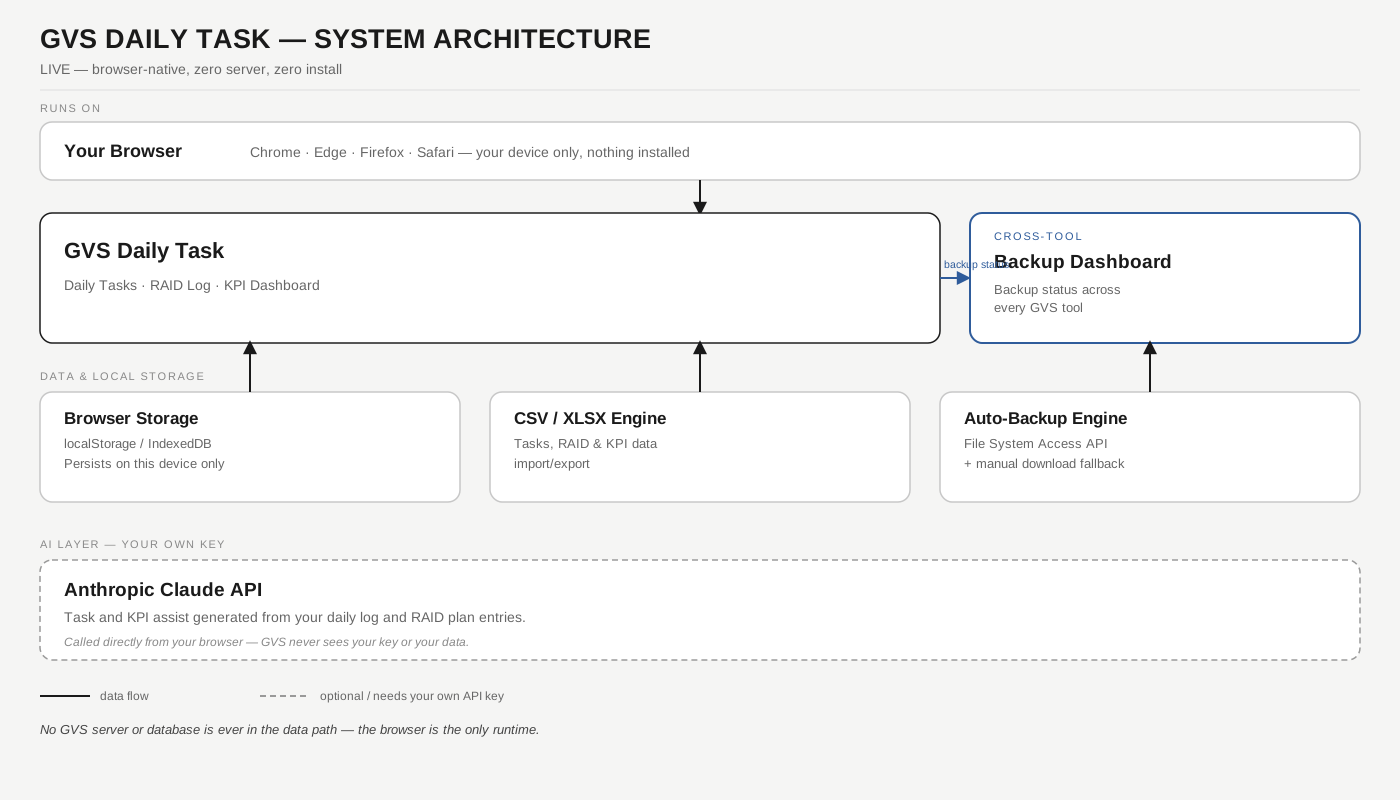
A personal daily-cadence tracker built around the CDO's own responsibility areas: log what you're working on, tag it to a category, move it through a release-wise tracking pipeline, and keep a running RAID log alongside it. A KPI dashboard turns that log into cycle time, SLA adherence, and approval-rate numbers — all computed on-device, none of it guessed by a model.
Personal · single-userZero serverYour Anthropic key
What this is, and isn't: GVS Daily Task is a personal daily-cadence log for one person working a CDO-style delivery role — it generalises the same "Office Work as a Service" pattern used to track fault-manager-style release work (Input Data → release-wise pipeline → RAID Plan → Report Generation), retargeted at the ten CDO responsibility areas (Delivery Governance, Program & Portfolio Management, Financial Oversight, Risk & Issue Management, Stakeholder Alignment, KPI & SLA Monitoring, Team Leadership, Vendor & Partner Management, Technology & Process Innovation, Strategic Transformation). It is not a team task-assignment tool — there's no owner-assignment workflow or per-person permissions, by design, matching how every other GVS tool works today: single-user, browser-local. See the Operating Framework for the full design note.
Daily Tasks
Every task logged against a CDO responsibility area, moving through the release-wise tracking pipeline as it progresses.