
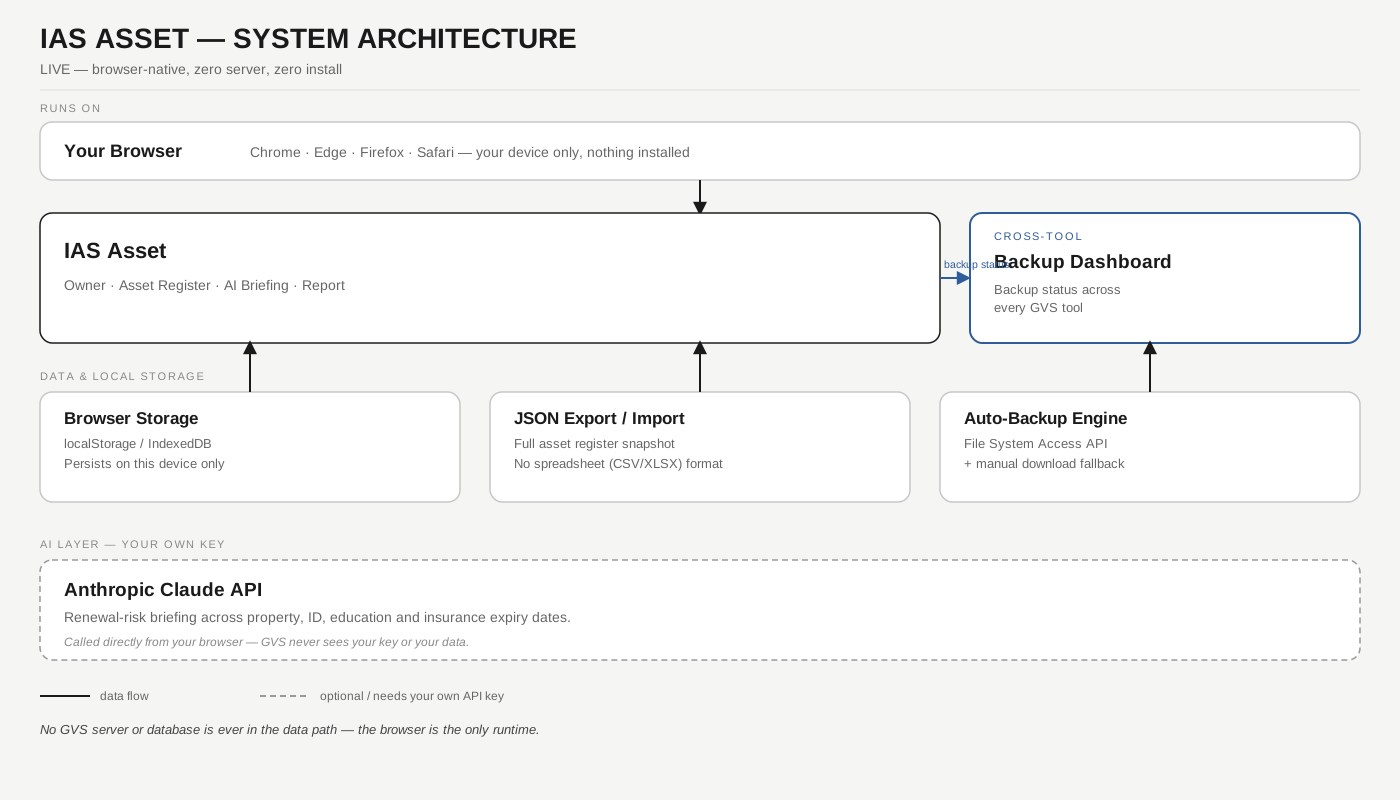
Asset & renewal tracker — runs entirely in your browser
Property, government IDs, education & certifications, and insurance/policy tracking with expiry alerts, plus a glass-box AI-assisted renewal risk briefing. Your asset details are stored only in this browser's local storage — nothing is sent to a GVS server. The only outbound call is to Anthropic's API, made directly from your browser using your own key. Passwords and credentials belong in IAS Vault — this tool covers everything else you'd otherwise track in a spreadsheet.
// Step 1 — Owner info
Basic context for the report header. This drives nothing in the scoring — the status always comes from each asset's expiry date.
// Step 2 — Asset register
Add each asset with its category, reference number, and expiry date (if it has one). An item past its expiry date pushes the overall status to Red; one expiring within 60 days pushes it to Amber.
// Step 3 — Glass-box renewal briefing
The Green / Amber / Red status below is computed deterministically from your assets' expiry dates — Claude only writes the plain-language renewal briefing and next steps.
// Step 4 — Report
Saved to this browser's local storage. Print to PDF, or export as JSON to keep alongside your own records.