
The Chief Delivery Officer role, start to end — run on GVS
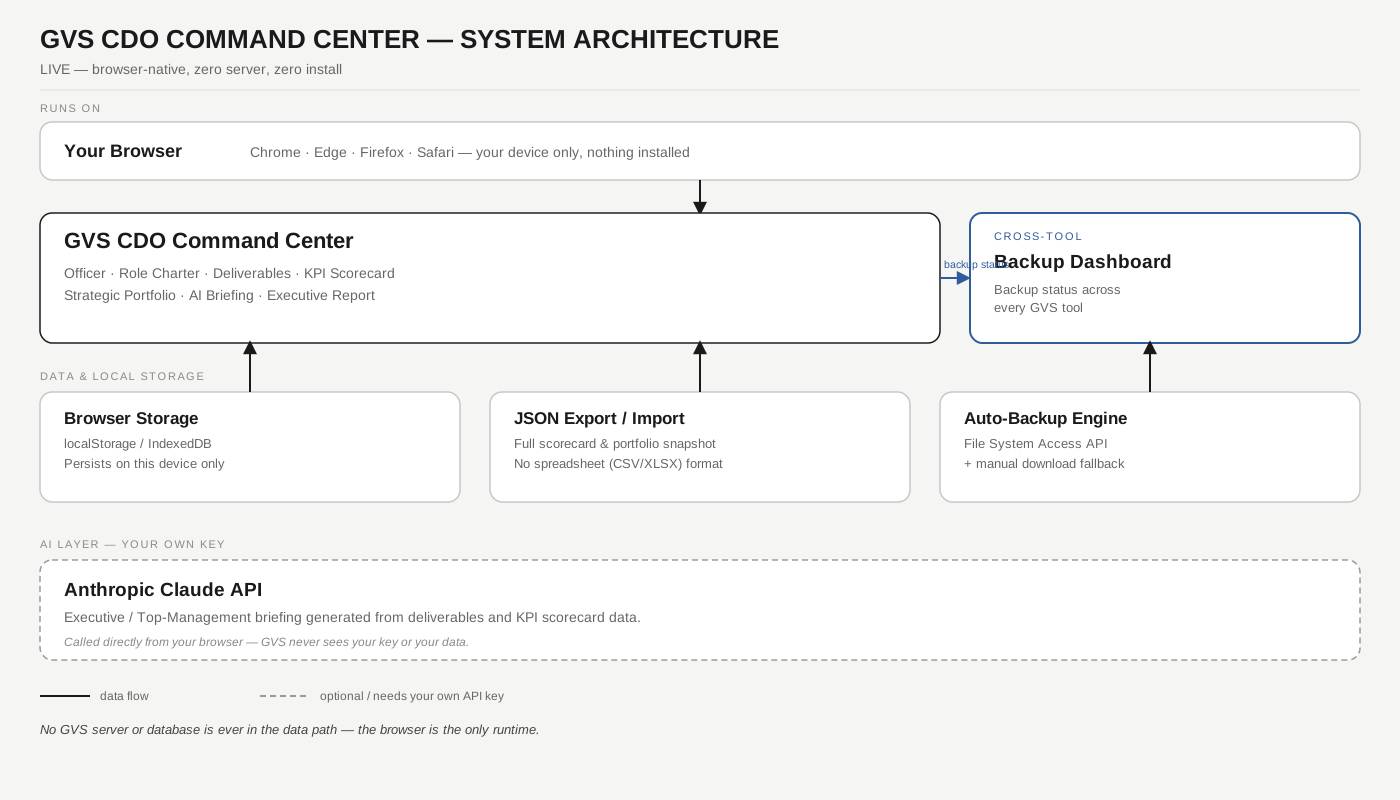
A role charter for the CDO across six delivery pillars, the deliverables that go with each one, and a glass-box KPI dashboard built to brief Top Management — not a slide deck. Your entries are stored only in this browser's local storage; nothing is sent to a GVS server. The only outbound call is to Anthropic's API, made directly from your browser using your own key.
// Step 1 — Officer & organisation
Basic context for the report header. This drives nothing in the scoring — every status below comes from the numbers you enter in Step 4.
// Step 2 — Role charter: Start → Operate → Transition
The CDO role isn't a 90-day sprint — it's three horizons layered on the same six delivery pillars. Each pillar links to the GVS tool that supplies its underlying data.
// Step 3 — Deliverables by pillar
Editable checklist, pre-populated per pillar. Check off what's done — the completion percentage feeds the executive report in Step 7.
// Step 4 — Executive KPI scorecard
Nine KPIs across the six pillars, each with a defined target range. Enter the current figure for each — status is computed deterministically: at/above target (or at/below, for the defect-density KPI) is Green, within a defined tolerance band is Amber, outside it is Red.
// Step 5 — Strategic portfolio, standards & alignment
The operational scorecard in Step 4 tells Top Management how delivery is running. This step is what most CDO dashboards leave out — the boardroom-facing layer: strategic (not operational) KPIs, a portfolio view tagged to the GVS manifesto's own Growth/Value/Standards split, a global-standards tracker, an efficiency roadmap, and a one-line CEO↔CDO alignment check.
Strategic KPIs — same deterministic Green/Amber/Red rule as Step 4, scored against boardroom-level indicators.
Portfolio view — every initiative tagged Growth, Value, or Standards, the same three categories as the GVS manifesto.
Global standards & benchmarking — adoption status against common industry frameworks.
Efficiency roadmap — next quarter
CEO ↔ CDO alignment snapshot — one line each, side by side, so growth priorities and delivery priorities are checked against each other, not assumed to match.
// Step 6 — Top Management briefing
The scorecard status is already decided by Steps 4-5 — Claude only turns it into the kind of plain-language narrative you'd actually say out loud to Top Management.
// Step 7 — Executive report
A one-page, boardroom-ready brief: operational scorecard, strategic KPIs, portfolio, standards, roadmap, alignment snapshot, and quarter-over-quarter trend where history exists. Saved to this browser's local storage. Print to PDF, or export as JSON to keep alongside your own records.